
Planning a cruise with Royal Caribbean is an exciting adventure filled with endless possibilities—from soaking up the sun on pristine beaches to enjoying top-notch dining and entertainment aboard the ship. But before you embark on your voyage, there’s one small but crucial detail you shouldn’t overlook: your luggage tags. While they may seem trivial, Royal Caribbean luggage tags play a significant role in ensuring that your bags reach your stateroom smoothly and efficiently.
In this in-depth guide, we’ll cover everything you need to know about Royal Caribbean luggage tags, including how to access them, printing tips, best practices, and even creative ways to protect them during your travels. By the time you finish this article, you’ll be equipped with all the knowledge to make your embarkation day stress-free and well-organized.
What Are Royal Caribbean Luggage Tags and Why Are They Important?
Royal Caribbean luggage tags are specially designed labels that help cruise staff identify and deliver your luggage to the correct stateroom. These tags contain essential information such as:
- Guest Name
- Stateroom Number
- Ship Name
- Sailing Date
Luggage tags are vital because cruise ships accommodate thousands of passengers, and having this information clearly displayed allows crew members to efficiently sort and deliver your bags. Without them, your luggage might face delays or even end up in the wrong cabin—a nightmare scenario for any traveler.
How to Access Your Royal Caribbean Luggage Tags
Step 1: Complete Your Online Check-In
The first step in obtaining your luggage tags is completing Royal Caribbean’s online check-in process. Typically, this becomes available 45–90 days before your sailing date, depending on your specific itinerary.
To complete your online check-in:
- Visit the Royal Caribbean website and log into your account.
- Navigate to the “Check-In” section under “Upcoming Cruises.”
- Enter all required details, such as passport information, emergency contacts, and payment for onboard expenses.
Once the check-in process is complete, you’ll receive your SetSail Pass, which confirms your readiness for embarkation. Your luggage tags will also become available to download and print.
Step 2: Download and Print Your Luggage Tags
After completing your online check-in, your luggage tags will be accessible in PDF format. Here’s how to find and print them:
- Log into your Royal Caribbean account.
- Go to your reservation details.
- Click on the “Print Luggage Tags” option.
These tags are formatted to fit standard letter-size (8.5 x 11-inch) paper. Each page typically includes two luggage tags, so make sure to print enough copies for all your bags.
Best Practices for Printing and Preparing Your Luggage Tags
1. Use High-Quality Paper
While regular printer paper works, it’s a good idea to use thicker paper (such as 60–100 lb cardstock) to make your tags sturdier. This helps prevent tearing or damage during transit.
2. Cut Along the Lines Precisely
Once printed, cut your luggage tags along the dotted lines to ensure a clean, professional appearance. Avoid cutting into the information fields, as this could obscure important details.
3. Invest in Luggage Tag Holders
To protect your tags from water damage or wear and tear, consider purchasing plastic luggage tag holders designed specifically for cruise travel. These holders come with reinforced loops or zip ties that secure the tags to your luggage handles.
Popular options include reusable holders available on Amazon or through Royal Caribbean’s online shop. Look for holders that fit Royal Caribbean’s luggage tag size (approximately 6.5 x 2.5 inches).
4. Attach Tags Securely
Using either the plastic holders or the printed tags themselves, attach your luggage tags securely to your bags. Be sure to loop them tightly around the handles so they don’t detach during the loading process.
How Do Royal Caribbean Luggage Tags Work on Embarkation Day?
On embarkation day, your luggage tags serve as the primary method for identifying and routing your bags. Here’s how the process works:
1. Drop Off Your Luggage at the Terminal
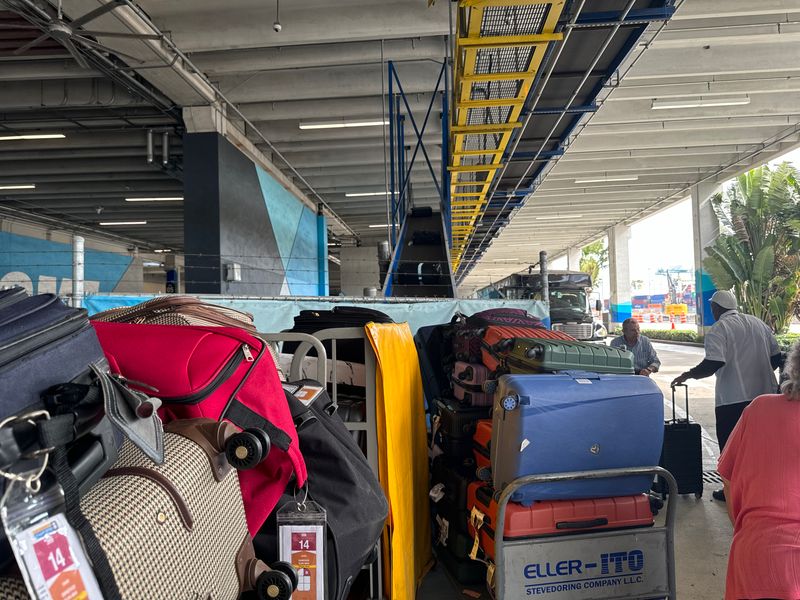
When you arrive at the cruise terminal, you’ll hand your checked luggage to port staff. These bags will be transported separately to the ship, while you carry any carry-on items with you.
2. Sorting and Delivery
Once aboard, cruise staff sort all checked luggage by stateroom number using the information on your tags. Bags are then delivered directly to your stateroom door, typically within a few hours of boarding.
3. Check for Missing Items
After your luggage arrives, double-check that everything is accounted for. If any items are missing or delayed, notify Guest Services immediately so they can assist in locating your bags.
Common Questions About Royal Caribbean Luggage Tags
1. What if I Lose My Printed Tags?
If you forget or lose your printed luggage tags, don’t worry. Staff at the terminal can provide replacement tags on embarkation day. However, this may take extra time, so it’s always best to print your tags in advance.
2. Do I Need Luggage Tags for Carry-On Bags?
No, you don’t need to attach luggage tags to carry-on items. These should remain with you during boarding and won’t be handled by the crew.
3. Can I Use Digital Luggage Tags?
Currently, Royal Caribbean does not support digital luggage tags. All tags must be printed and physically attached to your bags.
Pro Tips for Hassle-Free Luggage Handling
1. Label Your Bags Clearly
In addition to attaching your official luggage tags, add a personal identification tag with your name, phone number, and email address. This adds an extra layer of security in case your bag gets misplaced.
2. Pack Essentials in Your Carry-On
Since your checked luggage may not arrive in your stateroom immediately, pack a carry-on bag with essentials such as medications, travel documents, a change of clothes, and toiletries.
3. Avoid Overpacking
While it’s tempting to bring everything you might need, overpacking can make your luggage heavier and harder to handle. Stick to Royal Caribbean’s recommended packing guidelines and leave room for souvenirs.
Where to Buy Luggage Tag Holders for Royal Caribbean Cruises
To protect your tags, luggage tag holders are a worthwhile investment. Here are some popular options:
- Amazon: Search for “Royal Caribbean luggage tag holders” to find affordable, durable options with waterproof designs.
- Cruise Line Stores: Royal Caribbean often sells branded tag holders through their official website or onboard gift shops.
- Travel Accessory Stores: Retailers like Target and Walmart carry generic luggage tag holders that work well for cruises.
When purchasing holders, ensure they fit Royal Caribbean’s standard luggage tag dimensions.
What Happens to Your Luggage at the End of the Cruise?
At the end of your cruise, you’ll need to attach new luggage tags for disembarkation. These tags, provided by the cruise line on your final night, indicate your departure group and time. Bags are collected the night before disembarkation and transported to the terminal for pickup.
To ensure a smooth process:
- Place your tags on your bags before retiring for the evening.
- Keep important items with you in a carry-on bag.
Final Thoughts
While luggage tags might seem like a minor detail, they play a pivotal role in creating a hassle-free cruise experience. By understanding how to access, print, and protect your Royal Caribbean luggage tags, you can avoid unnecessary stress on embarkation day and ensure that your bags arrive safely at your stateroom.
With proper preparation, you’ll be free to focus on the more exciting aspects of your journey—like exploring tropical destinations, savoring world-class cuisine, and enjoying the unforgettable adventures that Royal Caribbean has to offer.
Now that you’re fully informed, all that’s left is to pack your bags, print those tags, and get ready for the cruise of a lifetime! Bon voyage!
